
Chartify, explained

Why Swift Algo comes with its own charts.

What Chartify is, why we built it, how it works next to TradingView, and whether it has everything you need. Short answers, no fluff.

01

What is Chartify?

SHORT ANSWER Our own charts, with Swift Algo built in.

Chartify is our own charting platform. It’s a normal candlestick chart, like the ones you know: real-time prices on forex, gold, crypto, stocks and indices, 13 timeframes from 1 minute, drawing tools, indicators and alerts. It runs in your browser and installs on your phone like an app.

Swift Algo is built right into it. Open a chart, and your labels, stop and target, backtest and optimizer are there. This is what it looks like:

Illustration · simulated data
02

Why does Swift Algo have its own platform?

SHORT ANSWER Because most indicators live on borrowed land.

Almost every indicator you can buy is a script running inside someone else’s charting platform. That platform decides what the script can do, how you get access and what it costs. That works, but it puts a ceiling on how good an indicator can get. We wanted Swift Algo to have no ceiling.

Most indicators

A script inside someone else’s platform

  • –Limited to what the platform’s script language can do
  • –No connection outside the chart, so no real AI
  • –Access and rules set by the platform
  • –Often a charting subscription on top
Swift Algo on Chartify

An indicator with its own platform

  • ✓We build whatever traders need, the moment it’s ready
  • ✓Real AI that reads your actual candles (bonus)
  • ✓Our platform, our rules. Your own login
  • ✓Charts included, $0 extra

Owning the platform means Swift Algo is never stuck. New features don’t wait for anyone’s permission.

03

Is Swift Algo still on TradingView?

SHORT ANSWER Yes. Every plan gives you Swift Algo on TradingView and on Chartify.

You get both. On TradingView, Swift Algo works on your own TradingView account, and the free TradingView plan is enough. On Chartify, it’s built right in, with Chartify Core included instead of another subscription. Use whichever you like, or both.

If you’re used to TradingView, Chartify will feel familiar: candles, timeframes, drawing tools, indicators and alerts work the way you expect. Nothing stops you from having both open.

On TradingViewSwift Algo on your own accountSubmit your TradingView username after checkout and get access. The free TradingView plan is enough.
On ChartifySwift Algo with its own chartsBuilt into Chartify, with Chartify Core included, $0 extra, and AI tools as a bonus.
04

Does Chartify have everything I need?

SHORT ANSWER Everything you’d use a charting platform for, plus Swift Algo.

✓Swift Algo X, built inLabels, stop and target, backtest, optimizer, trend dashboard
✓Real-time chartsForex, gold, crypto, stocks and indices, from established market data providers
✓13 timeframesFrom 1 minute up
✓Drawing tools and indicatorsThe tools you already know
✓Alerts with push notificationsPrice alerts and Swift Algo alerts
✓Browser and phoneNothing to download, installs like an app
✓ReplayRewind a market and watch it candle by candle
✓Paper tradingPractise with a demo account first
✓Trading journalWrite down what you did and why
✓Chartify AI and AI PainterBONUSAsk about the chart, or let it mark levels. AI can be wrong.

One thing it doesn’t do: Chartify never places trades. You keep trading with your broker, like now.

05

What does it cost?

SHORT ANSWER Nothing extra. It comes with Swift Algo.

Chartify Core is included with every Swift Algo plan

Monthly, quarterly or one-time, on top of your access on TradingView.

$49/month$0 extrawith Swift Algo
06

How do I get started?

SHORT ANSWER Check out, then set it up on TradingView, Chartify or both.

Pick your planCheck out on Whop, like any other purchase.
Choose where to use itOn Chartify, Swift Algo is already there. On TradingView, you submit your username and get access.
Watch the setup videoA step-by-step video shows you which settings to use.
Stuck at any point? Our team and the 32,000+ member Discord help you get set up.
07

Real screens, straight from the app

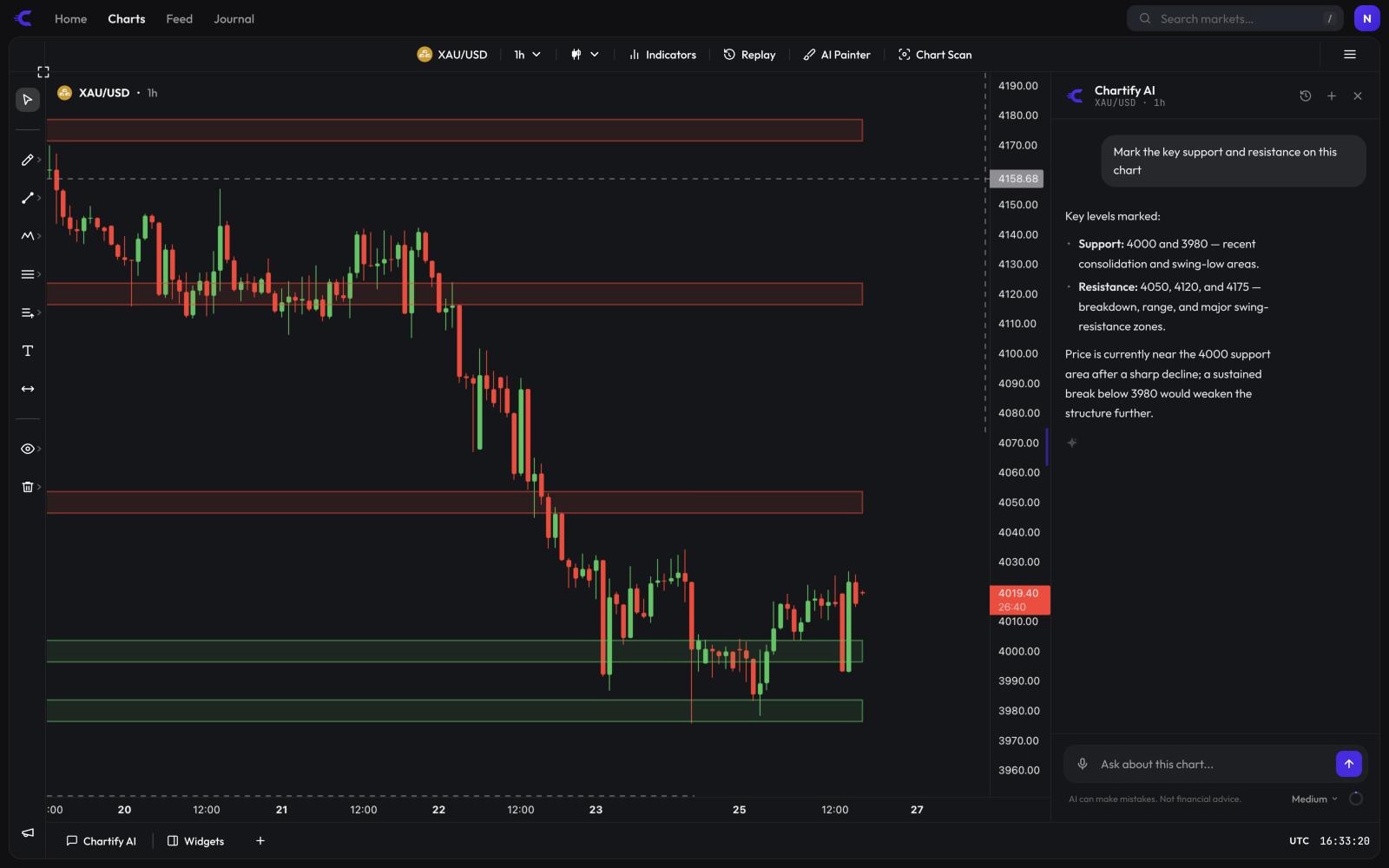
Chartify on gold (XAU/USD): Chartify AI marks key support and resistance levels on the chart

Real Chartify screenshot: Chartify AI marking support and resistance on gold. AI analysis can be wrong.
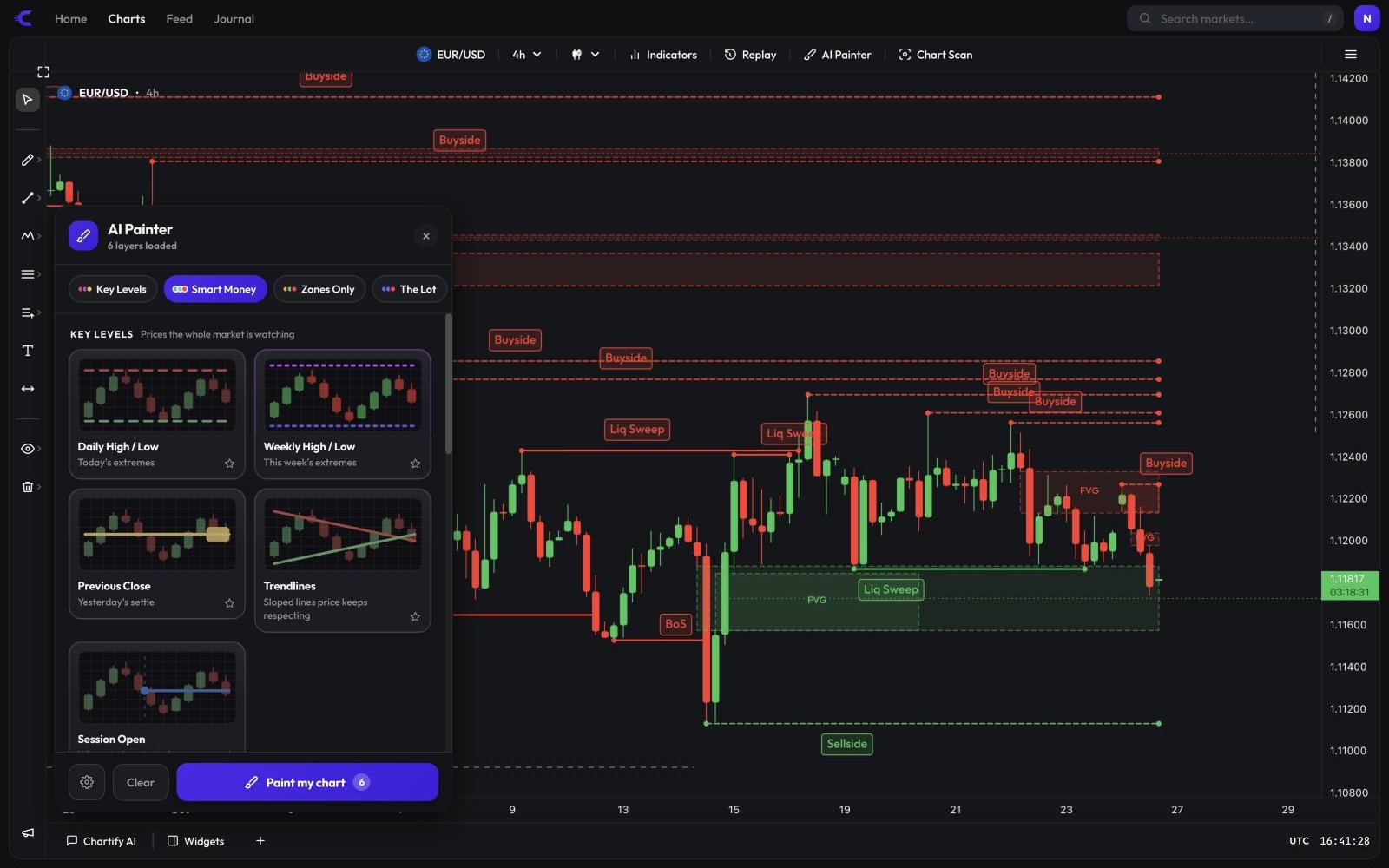
Chartify on EUR/USD with the AI Painter panel open and smart money levels drawn

Real Chartify screenshot: the AI Painter’s Smart Money preset on EUR/USD. AI analysis can be wrong.

08

More questions

Is Swift Algo still the main thing?
Yes. Swift Algo is what you buy: the labels, the stop and target on every label, the backtest, the optimizer and the alerts. You use it on TradingView, on Chartify or both, and the AI tools on Chartify are a bonus on top.
Do I have to switch to Chartify?
No. You can keep using Swift Algo on TradingView. If you try Chartify, it’s a normal candlestick chart with the timeframes, drawing tools, indicators and alerts you already know, and a step-by-step video shows you the setup and which settings to use.
Does it work on my phone?
Yes. Chartify runs in your browser on any computer, and you can install it on your phone like an app. There’s nothing to download.
Do I need the AI to use Swift Algo?
No. Swift Algo works on its own. The AI tools are a bonus for when you want a second look at a chart. AI analysis can be wrong, so always make your own decision.
Can I keep my broker?
Yes. Chartify is for charting and analysis and never places trades. You keep trading with your broker, like now.
Where does the price data come from?
Chartify gets real-time prices from established, professional market data providers. Prices can differ slightly from your broker’s, which is normal between any two price feeds.
Which markets does Chartify have?
Forex, gold, crypto, stocks and indices (like NAS100), with real-time charts and 13 timeframes from 1 minute up.